Sign into your Alpha account and follow the steps below.
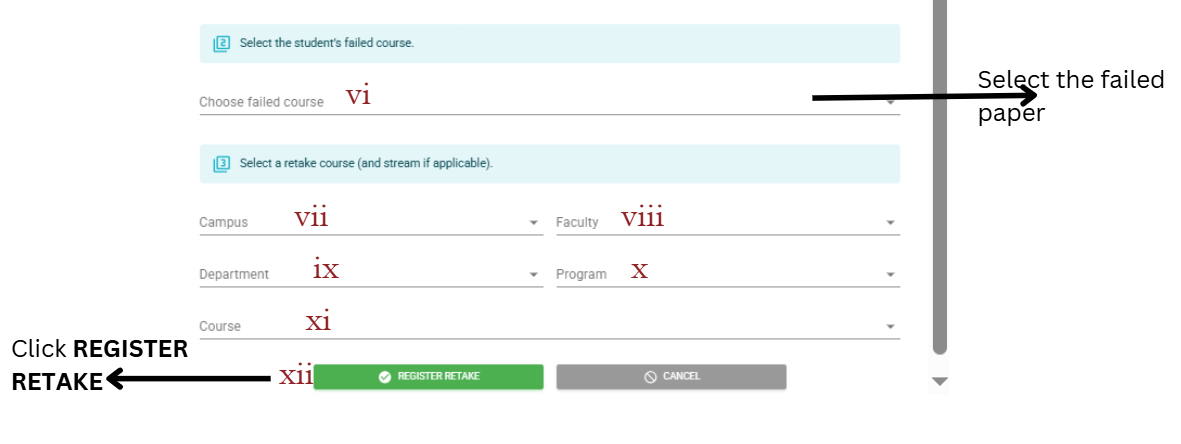
OPTION1: RETAKE REGISTRATION THROUGH REGISTER RETAKE SECTION.
1. Click REGISTER RETAKE button at 3. This will open the retake registration dialogue box.
2. On the retake registration dialogue box, fill in the required information as indicated.
Fill in the first section of the dialogue with the student's information as indicated.
The second section of the dialogue box, fill in the information about the paper the student will be doing and click REGISTER RETAKE.
OPTION2: RETAKE REGISTRATION AFTER SEARCHING FOR THE STUDENT.
1. On the search menu, type the student's access/registration number and click Search.
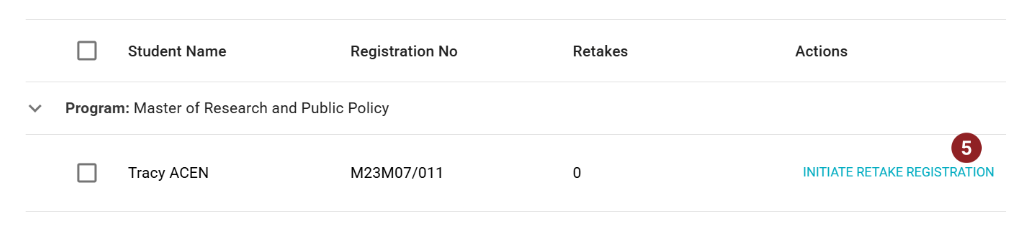
2. Click INITIATE RETAKE REGISTRATION at 5, to open the registration dialogue box.
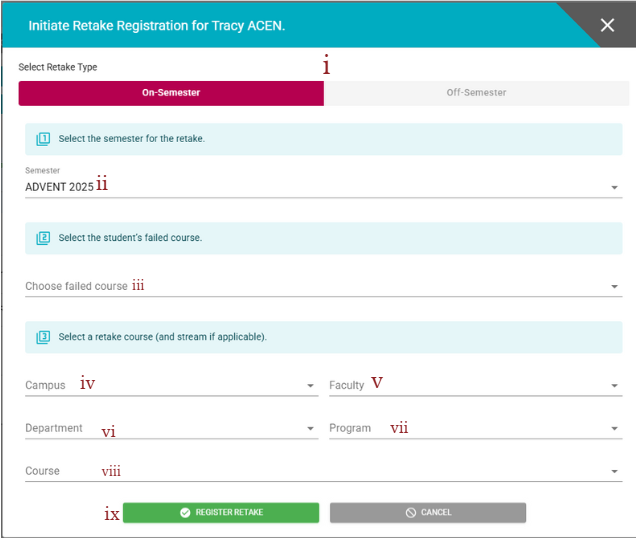
3. Select the Retake Type at (i), and then fill in the required information from (ii) to (viii). After that, click REGISTER RETAKE at (ix) to capture the registration.
NOTE:
- For you to be able to do the above, you should have the retake registration permissions. Contact the Alpha MIS Administrator for help by mail: misadmin@ucu.ac.ug
- Always cross-check with LECTURER/TUTOR MGT reports to validate if the student has been included in the lecturer's Retaking Students' class list.